Map Settings for Store Locator Plus®

Under the menu for SLP / Settings /Map  :

The settings contained in the map panel will change the functionality of the map domain, center map, zoom and appearance.

The following settings are available to manage functionality for both WPSLP stand alone plug-in and MySLP SaaS managed service..

At Startup

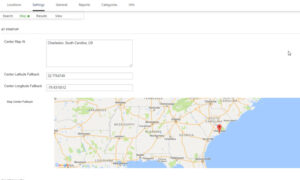
  • Center Map:   This is where you enter an address, or a state, or a location or  a specific latitude and longitude to be displayed as the initial focus for the Map.   If nothing is entered in this box , the default will be the center of the United States .   Google map has determined the center of  United States to  be somewhere in Kansas.  Example:  See Google Localizing the Map:  The geocodes “Toledo” based on the default region (US) to “Toledo, Ohio”  or  one which biases results based on a region set to ES (Spain) to “Toledo, Spain.
  • Center Latitude Fallback: Center Longitude Fallback:  These are the latitude/longitude settings  that will be called if the Google server is “busy” or offline and not able to geocode or “call” to load your locations.  If you reset to blank it will fill in with the Center latitude/longitude of the map domain you have chosen.    You can have a different Lat/long fallback  then your map domain or center map if you  choose.    An image of your fallback will  be displayed
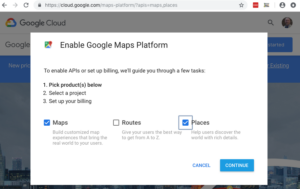
Geocoding stopped working suddenly

(This page has been updated to reflect the changes in Google Cloud Platform API changes)

Most likely reasons;

  • You moved your site or changed the domain name and did not change your Google Map API key or , as of JUNE 2018 Google API changes, did NOT ADD BILLING TO YOUR API KEY . See Getting Started
  • Check your Google Platform Usage reports
  • A self-imposed usage cap has been exceeded.
  • The provided method of payment is no longer valid (for example, a credit card has expired).
  • You have exceeded the QPS limits for a given API.
  • If you have the Power add-on and are using the import function , your csv file is incorrect, or your header rows are not accurate,  or they have wrong field names, the columns may be misaligned and the data field for an address could not import and/or does not geocode. Check your import message log.
  • Google does not recognize an address. See FAQ post

Store Locator Plus Location Imports troubleshooting

On  June 11, 2018  Google changed their API.  There is now a pay as you go billing requirement. You  will need to reconsider how to import, how often to import , and whether to break the list into smaller chunks , or skip geocoding.  (Or switch to the MYSLP SaaS managed service and choose the Professional or  Enterprise level plan ( restrictions apply) .

In order to perform bulk location imports with a CSV file for the WPSLP plugin you will need the Power add-on installed.  WPSLP Power add-on does not alleviate the need for you to obtain your own Google API key.  MySLP  SaaS users  do not need to obtain their own API keys but will need the Professional level plan or higher to import.

Google Geocoding and Browser keys

This article effects the WordPress StoreLocatorPlus  users “Do it yourself ” plug-in with pay as you go Google Maps API keys

MAP Service and API Keys

Changes as of June 11, 2018 will effect the WordPress Store Locator Plus (DIY) community.  Google requires all sites  using map services to have an API key with a billing account attached. See Google Developers console.

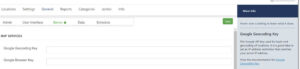
The Browser key is used to display the map and handle user-input addresses during a location search.  The Geocoding API  is used on your WordPress server to geocode locations you’ve entered via the Google “Places” box and  APIs.  You do not need the additional geocoding “key”   unless you have added  restrictions.  You do however, need to have the geocoding API enabled in your Google projects library.

Mixed Content Warnings and Site migration

Google’s push for all websites to be HTTPS  has been a game changer over the past few years with many companies  switching from HTTP to HTTPS with some hiccups along the way.  Some of the site transfer mishaps are minor, but if done incorrectly can cause your plug-ins to misbehave , and often is the case, after the transition team has left the building.

Mixed Content Warnings – Loading Assets Over HTTP

If you have never had HTTPS on your site, you will undoubtedly run into an issue with how your site assets are loaded. By assets we are referring to things like images, JavaScript, and even your CSS.   Insecure assets may not stop the green padlock from showing in browsers, but it will add an exclamation point warning to your users that information is being loaded insecurely.

 Site Migrations Vary

Occasionally we see comments from customers that Store locator Plus broke their site or is not working. When asked if they recently  migrated their site they often state nothing has changed.   On further investigation , or by inspecting their console  we often see the “Mixed Content warnings” quite often for images or icons from older versions of Store Locator Plus. This is a sure fire clue that there was indeed a “site migration”. They started out with their site when  the SLP plug-in was originally installed as HTTP and now , at least part of their site, is HTTPS.  This is known as  a protocol migration. If you migrate your site from HTTP to HTTPS, Google treats this as a site move with a URL change. That means you may need to obtain a new Google API key for SLP to work properly. With version SLP 4.9.15 you are allowed to add HTTP referrers now as long as you also obtain a geocode key. See  info about those changes under news

Upfront Investment

A site migration is a great opportunity to address legacy issues. If you have outdated legacy add-ons  this is a good time to invest in your future by planning for and including any  update expenses in your overall budget.  Including these costs in the project scope is the most cost-effective method to ensure your site stays relevant and on-track. When you consider that  issues that may arise after going live will require additional time , resources and, yes, may even create downtime and loss of traffic  to your site it is worth including the new versions in your budget.

Store Locator Plus Discrete Searches

The Experience add-on  for WordPress SLP or the Professional level Plan for MySLP SaaS provides a “search by city”, “search by state”, and “search by country” feature.   This search form element, when enabled, will build a drop down list based on the locations in your database.   This is meant to provide a hint to the user where your locations are.

The Advance level or basic SLP  search button  looks for locations closest  based on your other search form settings.  If your default radius is 100 miles and the user selects the state of Texas, the base plug-in will search for all locations within 100 miles of Google’s estimated “center of Texas”. With the Professional level plan  you can select certain settings to redirect the search selector and provide other options to direct or assist your site visitor.

Store Locator Plus INFO Plug-in Environment

Plug-in environment

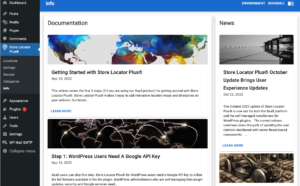
We often have questions posted from users asking why something is or is not working. The information needed to be able to assist them properly and efficiently is shown under the SLP/INFO tab under Environment

What is meant by the  (Plugin) Environment.

The plugin environment shows the versions of Store Locator Plus, and any active SLP add-ons you have installed, as well as the WordPress version, php version, MYSQL , the domain name and other useful data specific to the WPSLP environment.

You can also  find the latest release versions under your account Downloads List, and/or review the Versions under the Support tab on the WordPress Store Locator Plus  home site  to see if you have the most recent version of Store Locator Plus and the various add-on packs.

CSV Import Zip / Postal Codes formatting

Note: IMPORT requires  Power add-on for the stand alone WPSLP plugin  or if you are using MYSLP SaaS, the  Professional level or higher plan. 

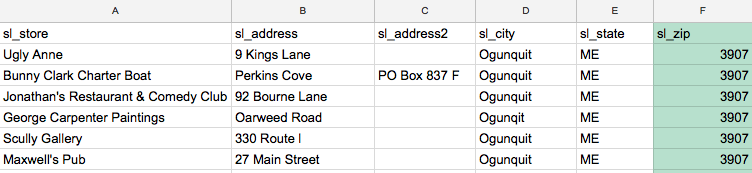
When creating a CSV import file make sure the zip / postal code column is properly formatted as text so you do not lose leading zeros.

The column header for postal/zip codes is zip or sl_zip.

In the United States many northeastern postal codes start with zero.   Many sheets, Microsoft Excel in particular, LOVE to leave off the leading zero if you enter a zip code as 03907 and save as CSV.

Invalid Postal Codes

In Excel, and many other apps, you can force a field where you are typing in numbers to be text by starting your entry with an apostrophe (‘).  Type ‘03907 when entering the data NOT 03907.

A good test to see if this is happening to you,  open your CSV file in Google Sheets and see what it looks like.  Does it look like the sheet above missing a zero and right aligned?

Another indicator that this column is set to a numeric type and not an text type is the data is on the RIGHT SIDE of the cell.  Text is left-justified (like sl_state) and numbers are right-justified.

Store Locator Plus 4.8 and above updates will disable Legacy add-ons

Legacy Add-ons

The   auto-update of WordPress v 4.8.2 and above required a major update to the WP Store Locator Plus free base plug-in resulting in the end of compatibility with the popular Pro Pack , Tagalong and other Legacy add-ons.  The Legacy add-ons are no longer supported nor maintained and have been retired over the past two years as announced in news posts, blogs , changelogs, mail campaigns  and social media.  If you are not sure if your add-on is considered Legacy, see the FAQ comparison featured to Legacy add-ons

Time to invest in your future

Some of our customers were surprised by the change and retirement of the  Legacy Add-ons.  We tried to give as much of a heads up as possible using news blogs,  content news to the home site and reached out using a  Mail Chimp campaign for those most likely effected.   Ultimately, there is no sure fire method to reach the thousands of customers who may have had these older add-ons installed.  If there is one thing we know, change in the technical genre is inevitable.  The SLP support team will always endeavor to help our customers transition to the new age.  We pledge they will see real value-added from updating their site and software . Please take a moment to review the multiple benefits of utilizing the newer Experience add-onPower add-on.

Although downgrading to an earlier version of SLP is an option, you may note that changes to the WordPress code and their security patches may disable features. Before making any changes to your site you should ensure you are backing up your site WP database and files.  It is very important to take this step before you have issues or worse, site crashes.    WordPress security has become more robust over the years.

For more information please see this important message from the author:

Store locator Plus  updates and retired add-ons